
Standard vs Sub Type Specific Task Groupings
Sub Types will only go against Task Groupings that are applicable to them.
For example, most Sub Types will be against the standard Pre Check group. However, if a Mudskip requires certain checks that other Units do not require when checking the Roof & Door Area, there would be two groups; a standard Roof & Door Area group and a Roof & Door Area (Mud Skip) group.
- Standard Roof & Door Area Grouping without the Mud Skip Sub Type:

- Roof & Door Area (Mud Skip) Grouping:
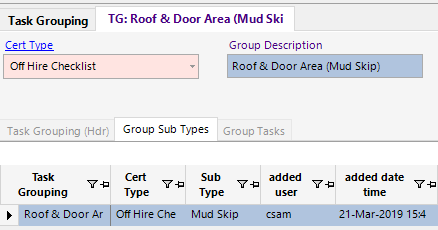
Creating these two Task Groupings means that when users perform a Checklist for a Mini Container for example, it would take over the Tasks from the standard Roof & Door Area group and when users perform a Checklist for the Mud Skip, it would take over the Tasks from the Mud Skip specific Roof & Door Area group.
When there is both a standard and Sub Type Specific Grouping, it is important to make the Group Order numbers the same. If the Roof & Door Area has its Order Number as 2, and Mud Skip specific group has its Order Number as 3, and users create a Checklist for a Mud Skip, it would not have a number 2 Task Grouping making it look like it has skipped a number.